Showing posts with label Cricut Explore. Show all posts

Saturday, July 11, 2015

Cricut iPhone App Twitter Party....Join Me!

I HAVE AN INVITATION TO SHARE WITH MY CRAFTY FRIENDS!!!
Product Experts,

You’re invited to a Cricut iPhone App Twitter Party! Please invite your followers and members of your groups to join us as well.

Here’s how it will work. From now until Tuesday afternoon, we’re encouraging everyone to start tweeting about the iPhone app using the #CricutEverywhere hashtag. These tweets might be in the form of questions or just statements about why you love the iPhone app. On Tuesday we’ll have Cricut employees on hand to answer these questions and select two lucky winners to receive prizes.

Here is a summary:
What: Cricut iPhone App Twitter Party
When: Tuesday, July 14, 2015 from 6-7pm MST
Hashtag:  #CricutEverywhere
Pre-submit questions: From now till Tuesday afternoon using the hashtag
Prizes: 2 lucky winners will receive digital access to the Summer Love cartridge and packages of Bright Vinyl, Printable Vinyl, and Classic Washi Sheets

Monday, July 6, 2015

Cricut IPhone App.....It's Here!!

So if your like me and are always trying to pack as much into a day as possible...Guess what just made Crafting more accessible......

The Cricut I Phone App is now up and running and sure to help us all improve our Crafting Life.

 With your I Phone and your Explore Air you can plan any project you like....especially on the go when inspiration is likely to strike.
Then cut when you get home and save half the time.  I can't wait to show you my new "Hot" project using my Cricut Explore!!!
Happy Cutting!

Tuesday, June 16, 2015

Neon-TASTIC!!!

How do you help a TEEN feel better about some shoes she wrecked at Girls Camp???
After a few dips in a bleach bath-we managed to get her comfy sneakers back to a presentable color-but they literally had all the life bleached out of them!

So thanks to My Cricut Explore and a couple of fun shapes from the Paisley Cartridge

and of course Cricut's new line of NEON IRON ON VINYL.....we decided to have some fun!
(This vinyl will have to go color side down to actually cut-the shiny side is the release paper-but I wanted you to see the fabulous colors)


 This is what we had-isn't it lovely.  Now don't forget my tips for WEEDING VINYL......yep they are still the same-just go even slower because this material can rip and warp.

And  VOILA.......happy teenage GIRL!!  She is modeling them below.  Now why did we put the vinyl on the inside????  Well she has more ideas for the outside-stay tuned!!!


Monday, April 6, 2015

Exciting News!!!


So my exciting news is this....
I have been asked to be one of the Cricut Explore experts!!!!  

So excited about the opportunity to share my passion for another one of Cricut's amazing machines.  
I will be posting videos and Explore exclusive content about once a month so I hope you will spread the word and join me for some fun
I will be giving away a Cricut goodie once a month for those that like my FACEBOOK PAGE or follow my website.  

I have lots of new things to share with you and can't wait for us to begin Explore "ing" what Cricut has to offer.


Monday, February 16, 2015

Cricut Explore Updates


Update Cricut Design Space Now 

Provo Craft has been busy making things even easier for us to use.  With the launch for the new Cricut Explore Air (Built in bluetooth capability available on HSN soon) comes the new updated software.  Things will look slightly different-code for even easier to use so look at some screen shots to preview the changes. If you click on a picture you can get a close up.


The Landing Page has slightly larger photos and when you choose a Make It Now project, it will go to the Cut Preview screen, bypassing loading the project onto the canvas first. If you want to customize the project, you can still click the Customize button and the project will load onto the canvas for you to make changes to the design.


Once on the canvas, the layout is a little different. Most noticeably is the Options Panel on the right. You can collapse this panel by clicking the arrow along the scroll bar.


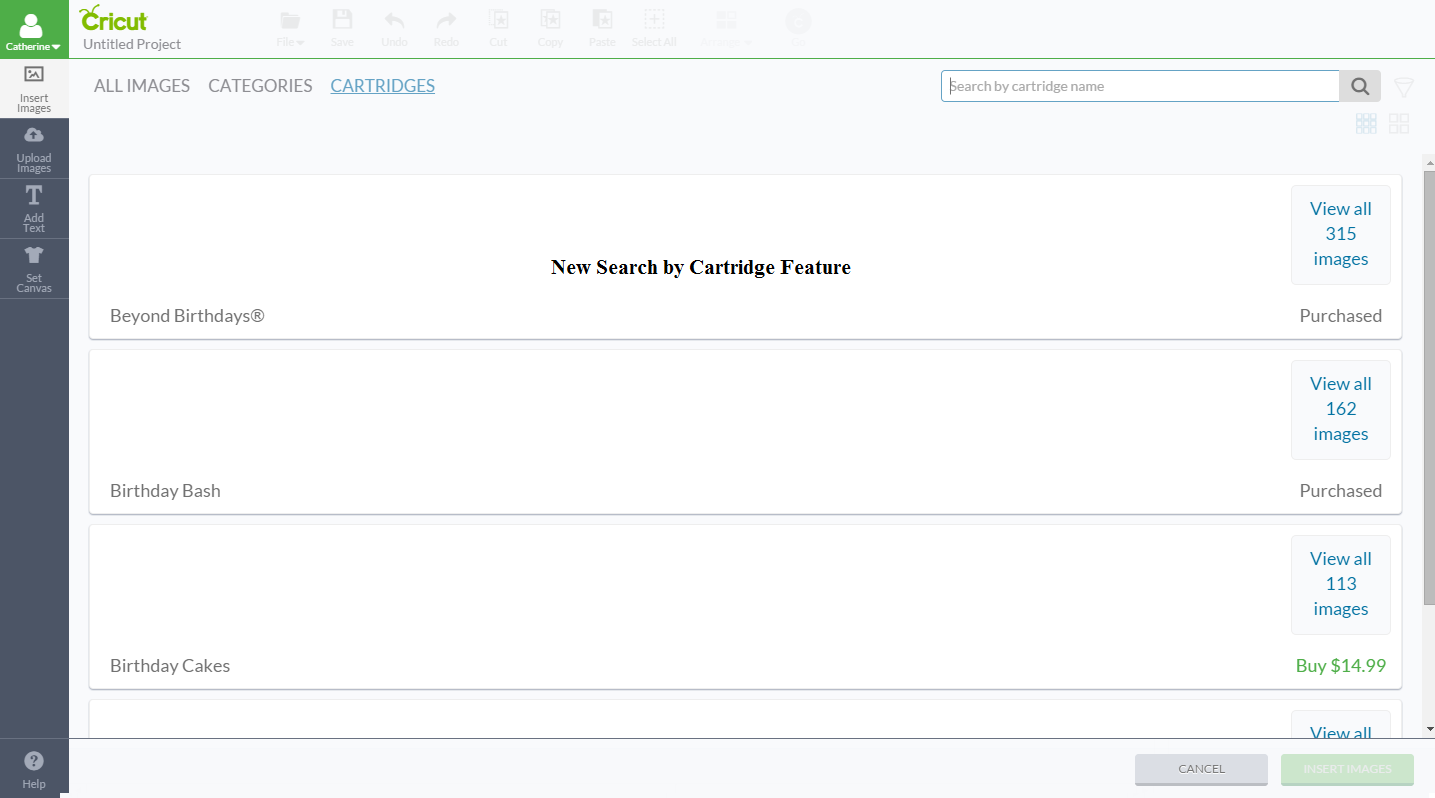
When you click on Add Image, you will notice a BIG difference! You have the option to make the images bigger. You can search by cart through an alphabetical list. And, you can search within a cart!


This is where you change the sizeof the images.


This is where you search by cart.


This is where you search within a cart.


This is where I searched for "Utah" within the 50 States cart.


This shows the Filter Option for searches.


This shows when you search an image and select images to add to the canvas.


This shows how the images now look when added to the canvas and what the image handles now do.


 This is an example of the Color Sync panel.


This is the new Cut Preview screen.


And yes, you can still drag and move an image on the Cut Preview mat!


An example of the Add Text feature.


An example of the Upload Image screen with a little more info to help you choose the right upload option.

And this is the pop box you get when you click your name on the canvas.


Do you like the improvements?? The search options are wonderful! 

Want more info? Need help with your Explore or Design Space? Want to see what other Design Space users are talking about? Or what projects they are making? Then come join me on Facebook in 

Saturday, October 18, 2014

Cricut Explore: Print Then Cut Feature Video

Now with the newest feature of the Cricut Explore machine, you can choose your image (either your own or one of 50,000+ in the Cricut Design Lab), flatten the image and then click 'Go'. Once printed, the Cricut Explore machine works its magic to bring your 2-dimensional idea into the 3rd dimension. Take a look at this super short instructional video (less than 4 minutes) and see just how easy it can be…